Advertisement
Google Ad Slot: content-top
Spring Boot JPA Specifications (Specification<T>)
Spring Data JPA Specifications allow you to create dynamic queries with filtering conditions in a flexible way.
Why Use Specification<T>?
- Build dynamic queries based on user input.
- Avoid writing multiple static queries.
- Combine multiple conditions easily (
AND,OR). - Supports pagination & sorting.
Adding Dependency
Ensure you have Spring Data JPA dependency and lombok in your pom.xml:
Example Entity Class
Let's assume we have a User entity with fields: id, name, email and age
user.java
import jakarta.persistence.*;
import lombok.*;
@Entity
@Table(name = "user")
@Getter
@Setter
@NoArgsConstructor
@AllArgsConstructor
public class User {
@Id
@GeneratedValue(strategy = GenerationType.IDENTITY)
private Long id;
private String name;
private String email;
private int age;
}
Table name : user
| id | name | age | |
|---|---|---|---|
| 1 | John | john@gmail.com | 25 |
| 2 | Mike | mike@gmail.com | 35 |
| 3 | Watson | watson@gmail.com | 40 |
| 4 | Kenny | kenny@gmail.com | 45 |
Create Specification
UserService.java
import org.springframework.beans.factory.annotation.Autowired;
import org.springframework.data.jpa.domain.Specification;
import org.springframework.stereotype.Service;
import java.util.List;
@Service
public class UserService {
@Autowired
private UserRepository userRepository;
// ✅ Get Users with Dynamic Filters
public List searchUsers(String name, Integer age, String email) {
Specification spec = Specification.where(UserSpecification.hasName(name))
.or(UserSpecification.hasAgeGreaterThan(age))
.or(UserSpecification.hasEmail(email));
return userRepository.findAll(spec);
}
}
Each method returns a Specification<User> that dynamically applies a filtering condition.
Create Repository Using JpaSpecificationExecutor
- Spring Data JPA provides
JpaSpecificationExecutorfor dynamic queries. JpaSpecificationExecutor<User>allows dynamic querying withSpecification<User>.
UserRepository.java
import org.springframework.data.jpa.repository.JpaRepository;
import org.springframework.data.jpa.repository.JpaSpecificationExecutor;
public interface UserRepository extends JpaRepository, JpaSpecificationExecutor {
}
Create Services
UserService.java
import org.springframework.beans.factory.annotation.Autowired;
import org.springframework.data.jpa.domain.Specification;
import org.springframework.stereotype.Service;
import java.util.List;
@Service
public class UserService {
@Autowired
private UserRepository userRepository;
// ✅ Get Users with Dynamic Filters
public List searchUsers(String name, Integer age, String email) {
Specification spec = Specification.where(UserSpecification.hasName(name))
.or(UserSpecification.hasAgeGreaterThan(age))
.or(UserSpecification.hasEmail(email));
return userRepository.findAll(spec);
}
}
Create Controllers
UserController.java
import org.springframework.beans.factory.annotation.Autowired;
import org.springframework.http.ResponseEntity;
import org.springframework.web.bind.annotation.*;
import java.util.List;
@RestController
@RequestMapping("/users")
public class UserController {
@Autowired
private UserService userService;
// ✅ Search Users with Filters
@GetMapping("/search")
public ResponseEntity> searchUsers(
@RequestParam(required = false) String name,
@RequestParam(required = false) Integer age,
@RequestParam(required = false) String email) {
return ResponseEntity.ok(userService.searchUsers(name, age, email));
}
}
Testing the REST API with Postman:
Once the application is running, test the endpoints:
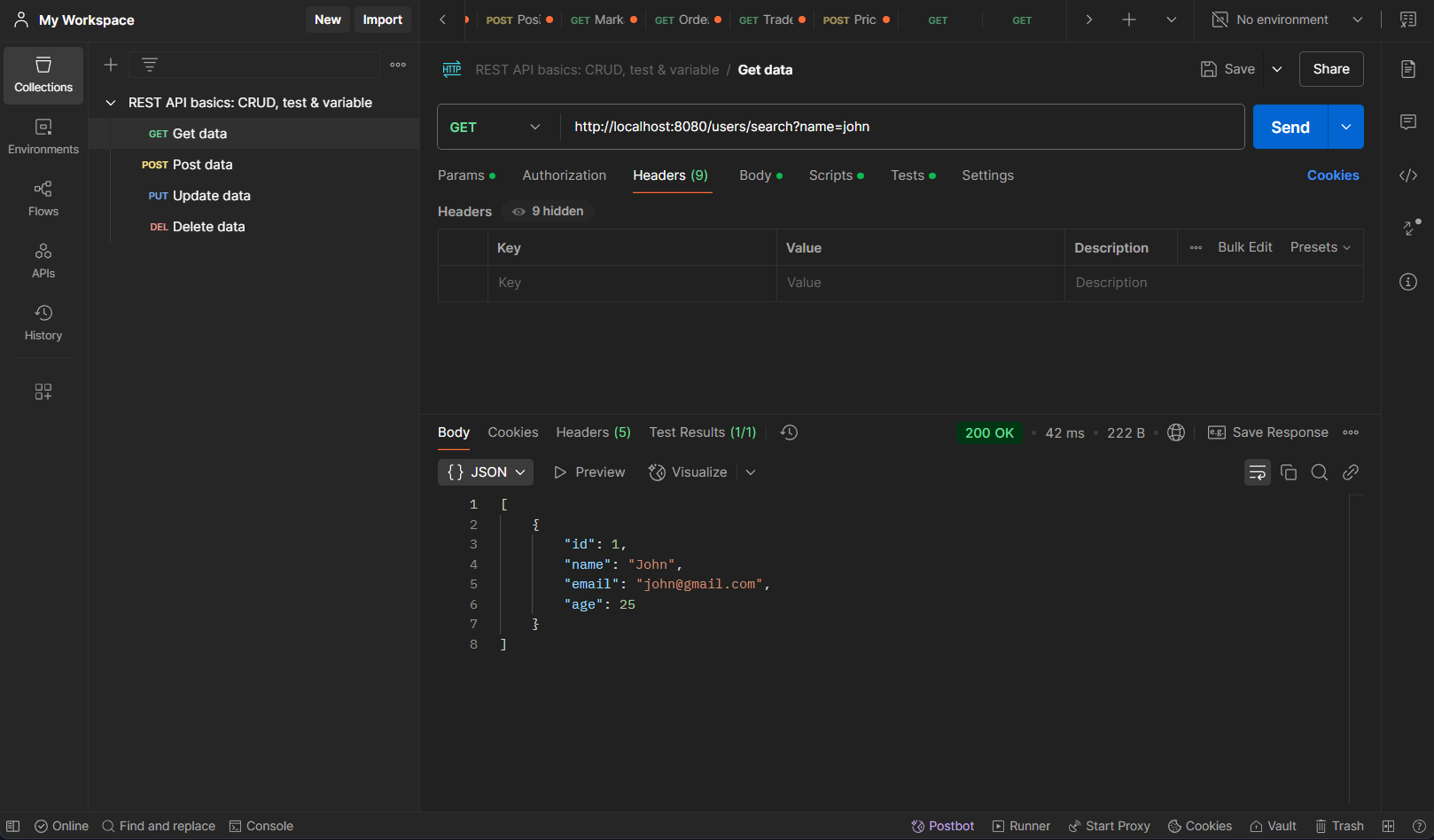
Get User like name GET:http://localhost:8080/users/search?name=John
SELECT * FROM users WHERE name LIKE '%John%';
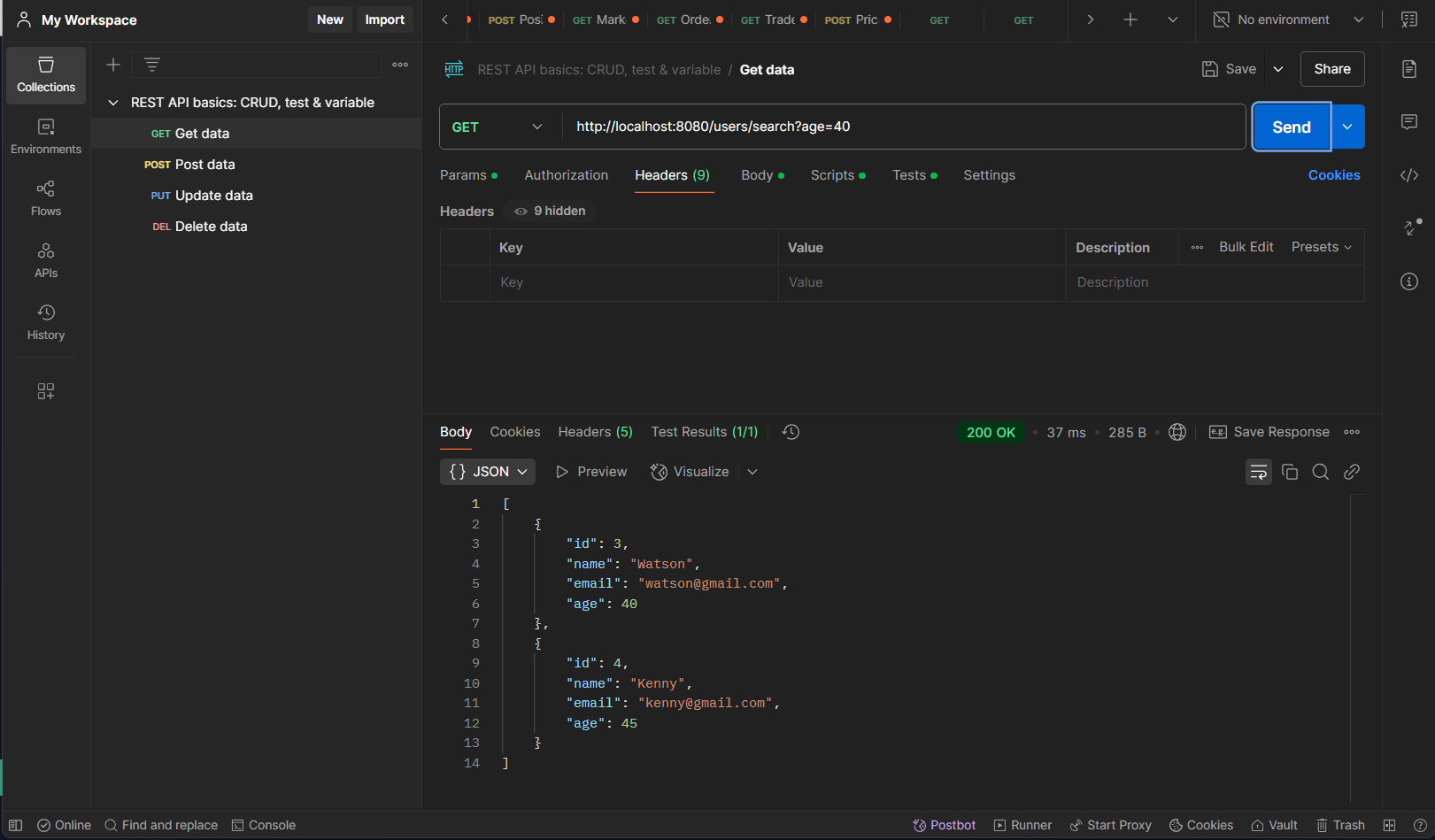
Get User by age greaterThanOrEqualTo GET:http://localhost:8080/users/search?age=40
SELECT * FROM users WHERE age >= 25;
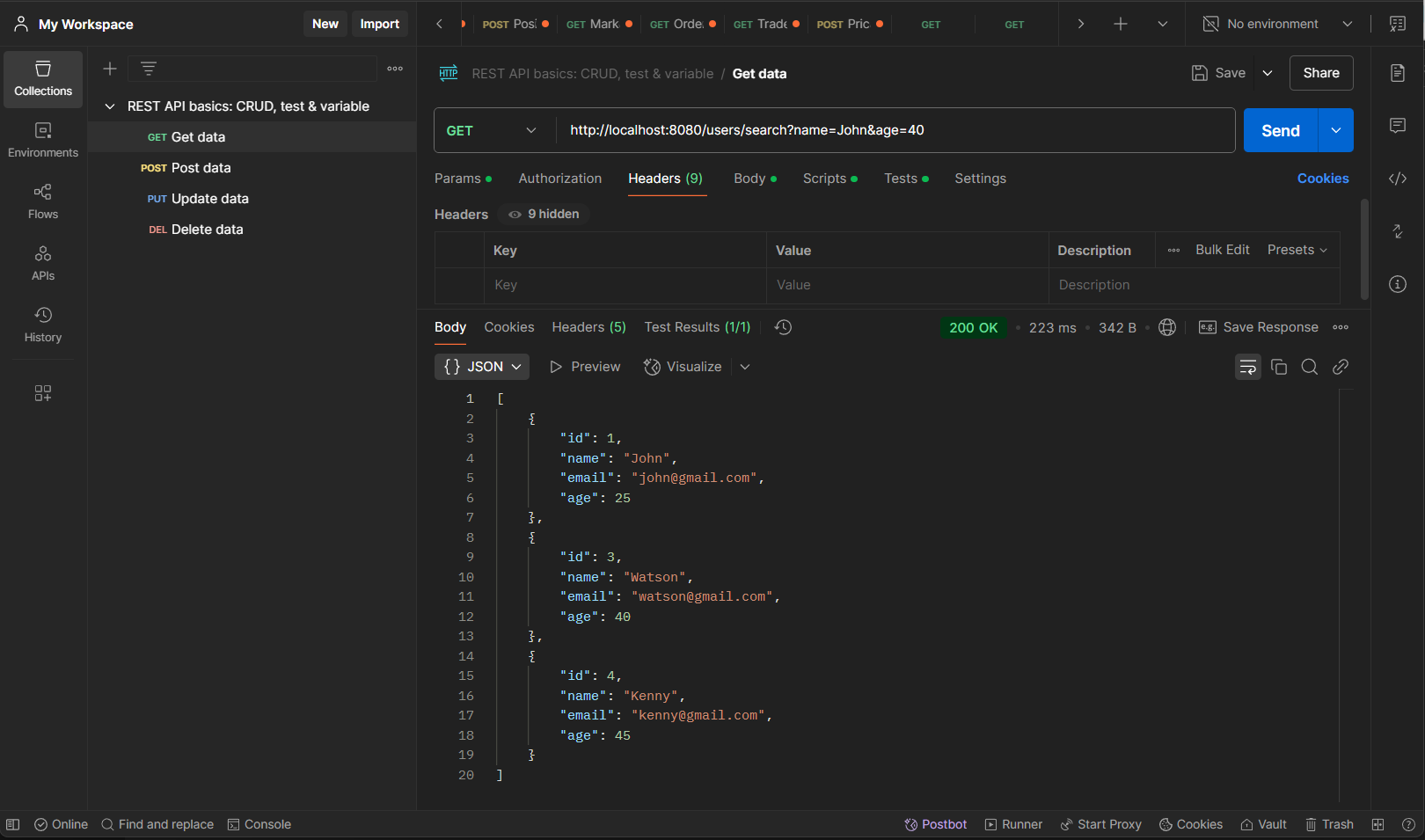
Get User by like name or greaterThanOrEqualTo age GET:http://localhost:8080/users/search?name=John&age=40
SELECT * FROM users WHERE name LIKE '%John%' OR age >= 25;